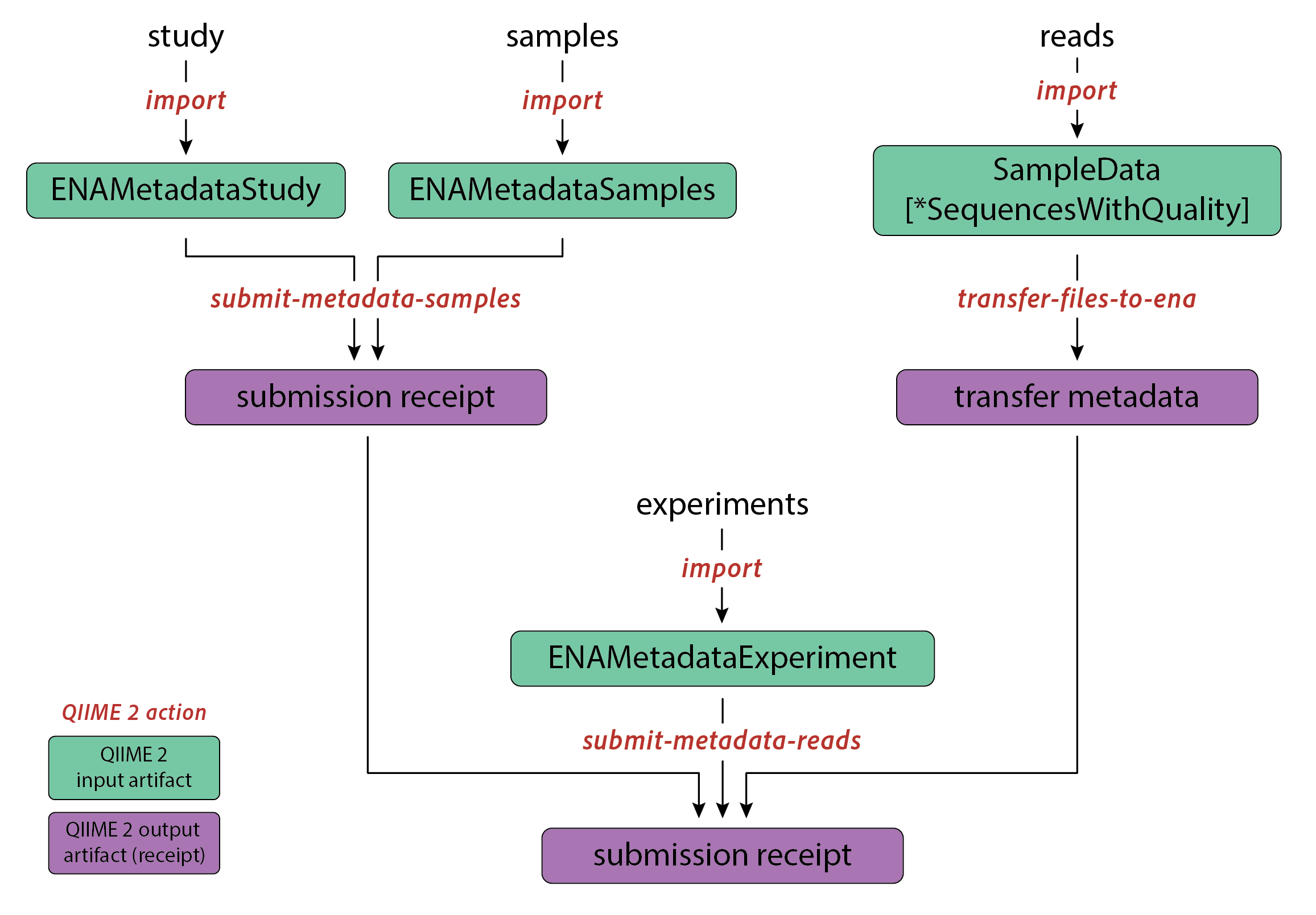
ENA Submission
After completing the installation and creating an ENA account, the submission process using the q2-ena-uploader consists of several steps:
Import data into QIIME 2 artifacts.
Upload sample and study metadata to ENA.
Transfer raw reads to the ENA FTP server.
Upload experiment metadata to ENA.
Step 1: Import data into QIIME 2 artifacts
Data imported into QIIME 2 are organized as data artifacts. Each artifact is assigned a Semantic Type, which determines its corresponding Artifact Class within the QIIME 2 framework.
Within our ENA submission workflow:
Raw reads can be imported into QIIME 2 using several different artifact classes, depending on the specific data format. An overview of these supported formats and import choices is available in the official QIIME 2 documentation.
Metadata — including studies, samples, and experiments — are imported as QIIME 2 artifacts with the Semantic Types
ENAMetadataStudy,ENAMetadataSamples, andENAMetadataExperiment, respectively.
These artifacts represent all required inputs for the ENA submission workflow. Once imported, they are stored as .qza files within the QIIME 2 environment. Proceed to the next sections to import all necessary input data into QIIME 2.
Raw reads
This is a simple example illustrating the import of FASTQ sequencing data into QIIME 2 artifacts. More import options are described here .
qiime tools import \
  --type 'SampleData[PairedEndSequencesWithQuality]' \
  --input-path my-sequence-data/ \
  --input-format CasavaOneEightSingleLanePerSampleDirFmt \
  --output-path demux.qza
The sections bellow describe all types of metadata imports.
Study
To import the metadata of a study into the corresponding QIIME 2 artifacts, run:
qiime tools import \
  --type ENAMetadataStudy \
  --input-path study_metadata.tsv \
--output-path study_metadata.qzaSample
To import the sample metadata into the corresponding QIIME 2 artifacts, run:
qiime tools import \
  --type ENAMetadataSamples \
  --input-path sample_metadata.tsv \
--output-path sample_metadata.qzaChecklists
For sample submission, ENA provides metadata checklists detailing the minimal attributes required for different sample types. Please review the full range of ENA sample checklists before submitting your samples.
When using the ENA default sample checklist for all your samples, you do not need to specify the default code ERC000011. However, if you apply multiple checklists for different samples, you must include all relevant ENA sample checklists codes in the metadata column checklist. In this case, create a single metadata TSV file that combines all columns from these checklists and fill in values only where applicable.
Minimal sample structure
Minimal sample structure refers to the ENA default sample checklist data structure. To create a valid TSV file, four mandatory parameters are needed for each sample:
alias(sample ID)taxon_idgeographic location (country and/or sea)collection date
When constructing a valid study metadata TSV file, consider consulting one of the provided examples in the Templates section.
Experiment
To import the experiment metadata into the corresponding QIIME 2 artifacts, run:
qiime tools import \
  --type ENAMetadataExperiment \
  --input-path experiment_metadata.tsv \
--output-path experiment_metadata.qzaMinimal experiment structure
The minimal experiment structure requires the following mandatory fields:
titlestudy_ref(study alias or accession number - should correspond to the alias indicated in the study metadata)sample_description(sample ID)platforminstrument_modellibrary_strategylibrary_sourcelibrary_selectionlibrary_layoutlibrary_nominal_length(only for paired reads)library_nominal_sdev(only for paired reads)
The field library_construction_protocol is optional.
When constructing a valid experiment metadata TSV file, consider consulting one of the provided examples, see more in Templates section.
Step 2: Upload sample and study metadata to ENA
Set ENA credentials
Before uploading to ENA, you need to set two environmental variables containing your ENA credentials:
   export ENA_USERNAME=<Webin-XXXXXX>
export ENA_PASSWORD=<password>Upload metadata
Execute the following QIIME 2 action to submit Study and Sample metadata to perform a test submission to the ENA dev server:
qiime ena-uploader submit-metadata-samples \
  --i-study study_metadata.qza \
  --i-samples sample_metadata.qza \
  --p-action ADD \
  --p-dev \
  --p-submission-hold-date <hold date> \
--o-submission-receipt samples_receipt.qza--i-study: Artifact containing metadata of the study.--i-samples: Artifact containing metadata of the samples.--p-action-type: 2 action types are supported: ADD (default) and MODIFY.--p-dev: A boolean parameter indicating whether the submission is a test.--p-submission-hold-date: The release date of the study, on which it will become public along with all submitted data. By default, this date is set to two years after the date of submission. Users can specify any date within two years of the current date. Accepted date format isYYYY-MM-DD.--o-submission-receipt: The output artifact containing the assigned ENA accession numbers for the submitted objects.
Step 3: Transfer raw reads to the ENA FTP server
Execute the following QIIME 2 action to transfer the FASTQ files to the ENA FTP server.
qiime ena-uploader transfer-files-to-ena \
  --i-demux <your reads artifact> \
  --p-action ADD \
--o-metadata transfer_metadata.qza--i-demux: The demultiplexed sequencing data, either single-end or paired-end.--p-action: Specifies the action to take. The default is ADD, but you can use DELETE to remove files from the ENA FTP server.--o-metadata: This is the output artifact containing information about the transfer or deletion status of files on the ENA FTP server.
Step 4: Upload experiment metadata to ENA
Execute the following QIIME 2 action to submit Experiment/Run metadata to ENA:
qiime ena-uploader submit-metadata-reads \
  --i-demux <your reads artifact> \
  --i-experiment experiment_metadata.qza \
  --i-samples-submission-receipt samples_receipt.qza \
  --i-file-transfer-metadata transfer_metadata.qza \
  --p-submission-hold-date <hold date> \
  --p-action ADD \
  --p-dev \
--o-submission-receipt receipt.qza--i-demux: The demultiplexed sequencing data, either single-end or paired-end.--i-experiment: Artifact containing experiments submission parameters.--i-samples-submission-receipt: Artifact containing the submission receipt of the study and samples.--i-file-transfer-metadata: Artifact containing the metadata of the file transfer to the ENA FTP server.--p-action: 2 action types are supported: ADD (default) and MODIFY.--p-dev: A boolean parameter indicating whether the submission is a test.--p-submission-hold-date: The release date for the data submission, determining when it will become public. The accepted date format is YYYY-MM-DD.--submission-receipt: The output artifact containing the assigned ENA accession numbers for the submitted objects.